The training goes over these four main parts in the Profiles menu.
First, theres the Profiles List, thats where you make and change the basic service plans. 
Then Pricing List for handling how much end users pay, you can tweak prices for profiles that already exist.
Creating a new profile starts with picking the type, prepaid means they pay to get back on or postpaid with monthly bills and no cuts. You add basic details next, give it a name like 10 Mbps, make sure its enabled, and put in the starting price
Speed setup involves download and upload rates, so for 10 Mbps you type 10240 kbps, that part feels a bit technical. Expiration is for how long it lasts, maybe a month or days and hours if its card based. After you submit, it shows up in the list with the speed and price you set.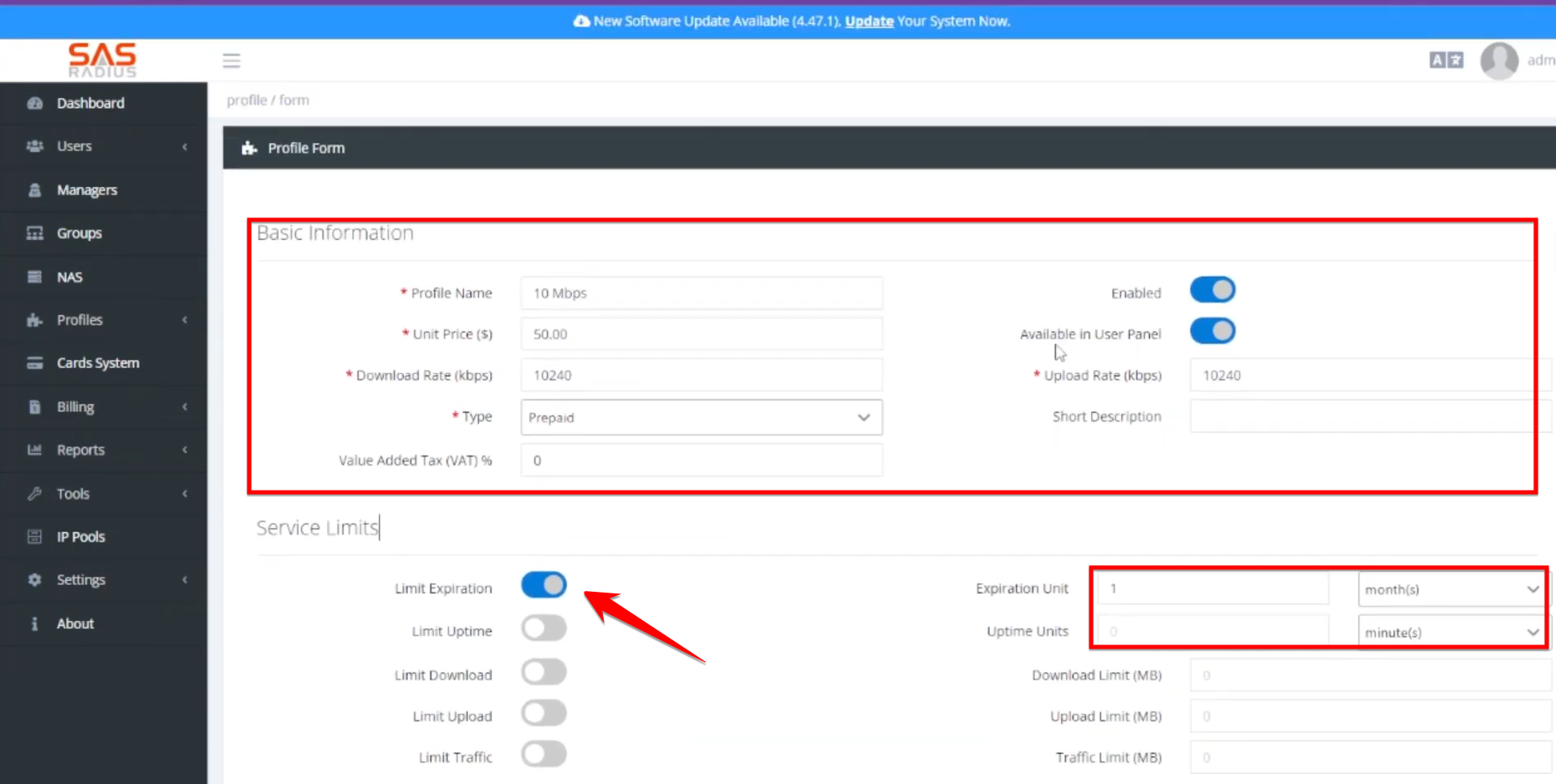
And for user panel, you decide if a profile shows up so customers can switch plans on their own, some might like that option
Aslo you can check daily traffic limit and it allows you to set up alerts via SMS, Telegram, or Email when users reach specific data thresholds